Popup Templates: How to Choose the Right Design for Your Goal
April 17, 2026
12
Min Read Time
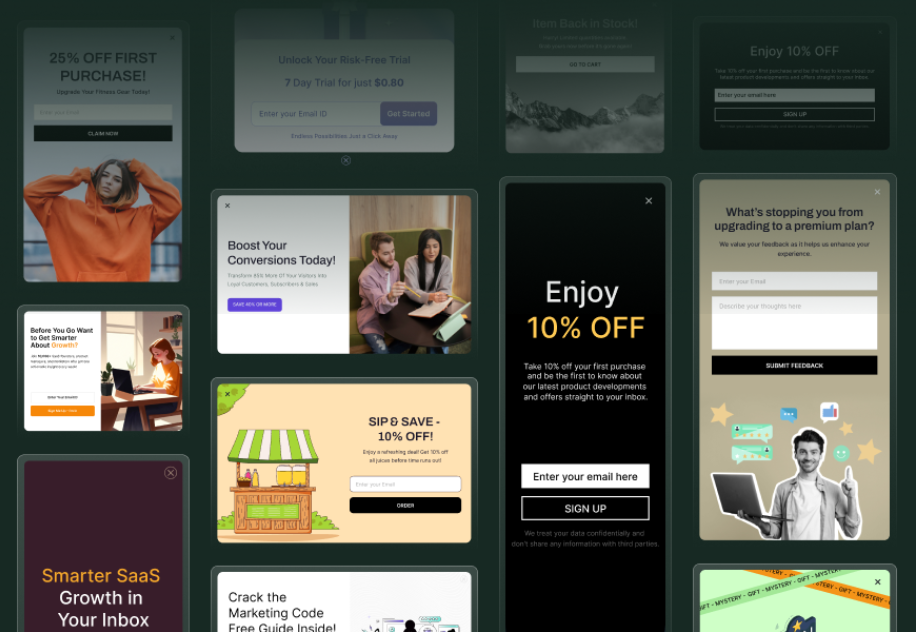
The right popup template isn't just a design choice; it's a conversion decision. Popup templates are pre-built overlays with the headline structure, CTA placement, form fields, and visual hierarchy already configured for a specific conversion goal. Choosing the wrong popup template design for your goal is one of the most common reasons popups underperform. Personalized, goal-aligned best popup templates for website use convert 20–40% higher than generic designs, and the layout you start with determines most of that outcome before you write a single word of copy.
Most businesses approach popup design backwards. They find a template that looks visually appealing, drop in their offer, and wonder why conversions are flat. The problem isn't the design, it's the mismatch. An email capture template optimized for a single-field newsletter signup is structurally different from an exit intent template built to recover abandoning visitors. Using one to do the job of the other means you're fighting the design instead of working with it.
In this guide, you'll find a clear definition of what popup templates are, a full breakdown of every popup design template type with conversion data, a goal-by-goal matching system, real industry popup template examples, a design checklist, and a step-by-step process to customize and launch your first template in SuperPopups, free popup templates included, no code, no designer required.
What Is a Popup Template?
A popup template is a pre-built website overlay design that includes the structural components needed for a specific conversion goal, typically a headline area, subheadline, one or two form fields, a CTA button, an optional image slot, and micro-copy like a trust line or social proof element. Everything is pre-positioned based on what converts best for that template's intended goal.
The key distinction between a template and a blank-canvas design is that a template has already solved the layout problem for you. The headline-to-CTA spacing, the field count, the visual weight of the button, the image-to-text ratio, these decisions are baked in, informed by what actually drives conversions rather than what looks good in a style guide.
Why starting from a popup design template outperforms building from scratch:
Pre-tested layout removes guesswork about element hierarchy and CTA visibility
Goal-specific structure means the design supports your conversion objective from the start
Faster to launch, customize copy and offer, not positioning and sizing
Mobile responsiveness is already built in
You can A/B test copy and offer changes immediately, rather than spending time on base design
The best popup templates for website use are those that map directly to a single, specific goal, not multipurpose designs that try to do everything at once. Whether you need a free popup template for email capture or a premium eCommerce popup template for discount recovery, matching template type to goal is the only variable that matters.
What Are the Different Types of Popup Templates?
Different popup design templates are built for different conversion goals. The template type you choose, whether a newsletter popup template, a discount popup template, or a lead generation popup template, determines your trigger, your form structure, and how aggressively you present your offer. Here's the complete breakdown with conversion data:
Popup Template Type
Primary Goal
Avg CVR
Best Trigger
Best Use Case
Modal (Lightbox)
Email capture, lead gen
3.49–4.82%
Time delay (5–8 sec)
Blog posts, landing pages, homepages
Exit Intent Template
Bounce reduction, cart recovery
3.94% avg / 19.77% top
Exit intent
Product pages, pricing, checkout
Newsletter Template
Email list building
4–8.62%
Scroll depth (50–60%)
Blog content, content sites
Discount Template
eCommerce conversion
7.45% avg
Time delay or exit
Product pages, category pages
Gamified (Spin-to-Win)
eCommerce list building
10.15–30.38%
Page load or exit
Fashion, beauty, health stores
Multi-Step Template
High-quality lead gen
5.17–5.64%
Scroll or click
SaaS, B2B, content sites
Sticky Bar
Announcement, passive awareness
~3.69%
Always visible
Sitewide sale, shipping offer
Fullscreen Template
High-stakes lead gen
Varies
Time delay (5+ sec)
Welcome mat, age gate
Slide-In
Non-intrusive capture
~3.5%
Scroll or time delay
Blog posts, low-friction capture
Click-Triggered
High-intent delivery
22.65–54.42%
Visitor-initiated click
CTA buttons, anchor links
The CVR gap between a generic modal and a click-triggered popup template isn't a design quality issue, it's an intent issue. Click-triggered popup templates for website visitors convert at over 10x the rate of standard modals because those visitors have already self-selected. The same logic applies when choosing between an email popup template and an exit intent popup template, same traffic, completely different intent signals. Understanding that distinction is what separates a popup template design tip that sounds nice from one that actually changes your numbers.
How to Choose the Right Popup Template for Your Goal
This is the core question most guides skip: which popup template matches which goal? Here's the direct mapping, five common goals with the specific template type, trigger, and offer structure that fits each one.
Goal 1: Build Your Email List (Blog or Content Site)
Use a newsletter popup template with a scroll-triggered activation at 50–60% page depth. The visitor has already demonstrated genuine interest by reading that far, they're in the right mindset for a relevant content offer. This is also the highest-performing placement for free popup templates with a content upgrade offer. Pair the template with a specific lead magnet (checklist, PDF, email series) rather than a generic "subscribe" ask. Delayed popups triggering after 20–50 seconds reduce bounce up to 45% while increasing email capture 20–43% compared to immediate popups.
Goal 2: Capture Qualified Leads (SaaS or B2B)
Use a lead generation popup template, specifically a multi-step popup template format. Ask one yes/no qualifying question first, then reveal the email field. Multi-step popups drive 8–9x better engagement than direct single-step forms and capture segmentation data you can use downstream in your email sequences. For SaaS popup templates, the goal is rarely just the email; it's the email plus a behavioral signal about where the visitor is in their decision.
Goal 3: Recover Abandoning Visitors (eCommerce)
Use an exit intent popup template with a single-field form and a time-sensitive offer. The template should be lightweight, minimal text, maximum clarity. The visitor is leaving; they don't have time for a three-paragraph explanation. One offer, one button, one line of trust copy. Well-configured exit intent templates recover 10–20% of abandoning visitors on high-intent pages.
Goal 4: Drive eCommerce Discount Conversions
Use a discount popup template or a gamified popup template (spin-to-win). These are the two highest-performing eCommerce popup templates, gamified formats average 10.15% CVR with top campaigns reaching 30.38%, making them the highest-converting format for eCommerce list building. The mechanism, curiosity plus reward, means visitors are engaged before they see the email field. For straightforward discount offers without the spin mechanic, a clean modal discount popup template with a countdown timer (tied to a genuine deadline) converts 28% higher than the same template without urgency.
Goal 5: Announce a Sale or Update (Any Site)
Use a sticky bar template. It runs site-wide, never interrupts the browsing experience, and keeps your message visible without blocking content. Sticky bar templates are the right choice when the goal is awareness, not immediate conversion, flash sales, free shipping thresholds, product launch announcements. Pair a sticky bar with an exit intent template on key pages for maximum coverage.
A fashion retailer running a 48-hour weekend sale used two eCommerce popup templates simultaneously: a gamified popup template (spin-to-win) for new visitors on homepage entry with a 5-second delay, and an exit intent popup template for product page abandoners. The spin template averaged 12% CVR for email capture. The exit template recovered 17% of visitors who reached the product page but didn't add to cart. Combined, the campaign added 2,400 new email subscribers over the weekend, all from traffic already on the site. No ad spend increase required.
SaaS: Multi-Step Content Upgrade Template
A B2B SaaS company used a lead generation popup template in multi-step format on their pricing page, one of the highest-exit pages on the site. The first step asked: "What best describes your team?" with three clickable options. After the visitor clicked, step two showed a relevant content upgrade (a ROI calculator or a feature comparison guide, depending on the answer). The segmentation allowed the company to send different onboarding sequences to each segment. Trial-to-paid conversion from popup-sourced leads ran 18% higher than leads from other sources.
Blog / Content Site: Newsletter Template with Content Upgrade
A marketing blog replaced a sitewide generic "subscribe to our newsletter" popup with email popup templates customized per post category, each acting as a newsletter popup template offering a content upgrade directly related to the article topic. A post about SEO triggered a popup offering a free keyword research template. A post about email marketing triggered a popup offering a subject line swipe file. The result: email capture rate rose from 1.8% to 6.3%, a 250% lift, from the same volume of traffic. The only variable was template relevance.
What Makes a High-Converting Popup Template? (Design Checklist)
These popup template design tips apply regardless of template type, whether you're running a discount popup template, a newsletter popup template, or a SaaS popup template for lead qualification. Run through this list before every popup goes live:
✅ Benefit-first headline: leads with what the visitor gets, not what you want ("Get 30 Subject Lines That Double Open Rates" not "Subscribe to Our Newsletter") ✅ Single CTA button: one action only; multiple buttons create decision paralysis and lower CVR ✅ Popup CTA design: use first-person button text ("Send Me the Guide" beats "Download"); action verbs like "Get," "Unlock," "Claim" increase CTR by 40% ✅ Single email field only: every additional form field reduces completion rate by 10–20% ✅ Trust micro-copy: one line below the CTA: "No spam. Unsubscribe anytime." Reduces hesitation, especially from cold traffic ✅ Social proof element: "Join 12,000+ subscribers" or a short testimonial; adds social proof that boosts CVR by 32% ✅ Visible close button: a clearly accessible X in the top-right corner; hiding it is a dark pattern that increases bounce, not conversions ✅ Mobile-optimized layout: the template should work as a compact modal or slide-in on mobile; a full-screen desktop layout that collapses badly on mobile is a Google Core Web Vitals risk ✅ Countdown timer (where applicable): only use when tied to a genuine deadline; real urgency timers increase conversions by 28%; fake ones destroy trust ❌ Avoid: image-heavy designs on mobile: large images slow load time and increase the chance visitors close before the popup renders ❌ Avoid: multiple CTAs: "Subscribe or maybe learn more or perhaps follow us" is not a popup, it's a menu ❌ Avoid: vague offers: "Get our latest updates" doesn't give visitors a concrete reason to act; specificity always beats vague incentive
How to Customize a Popup Template in SuperPopups (Step-by-Step)
You can find the best popup templates, customize them fully, and go live in under 10 minutes using the SuperPopups no-code popup builder. Here's the exact process:
Step 1: Browse the Template Library
Go to the popup templates library and filter by your goal: email capture, exit intent, discount, announcement, or lead generation. SuperPopups offers free popup templates across every format, choose the template category that matches your conversion goal, not the one that looks best visually. SuperPopups' free popup templates library includes pre-built designs for every major popup type, newsletter, discount, gamified, multi-step, sticky bar, and slide-in. Start with the template category that matches your conversion goal, not the one that looks best visually.
Step 2: Select Your Template and Open the Editor
Click on any template to preview it and open it in the visual editor. You'll see the full layout, headline, subheadline, form field, CTA button, image slot, and close button, all editable without touching code. Every element is clickable and directly editable in the canvas.
Step 3: Edit Your Headline, Offer, and CTA Copy
Replace the placeholder copy with your actual offer. Use the headline formula: [Specific Outcome] + [Timeframe or Ease]. Change the CTA button text to first-person copy. Add your trust micro-copy line below the button. If your template includes an image slot, use a relevant product photo, a lead magnet mockup, or a high-contrast brand image. Well-designed popup design templates with relevant images generate ~70% more signups than text-only versions, one of the most impactful popup template design tips you can apply at the customisation stage.
Step 4: Set Your Trigger and Targeting Rules
Choose your behavioral trigger: exit intent, scroll depth, time delay, or click-triggered. Match the trigger to your page type (exit intent for product/pricing pages, scroll for blog posts, click-triggered for CTA buttons). Then set your targeting rules: which pages the popup appears on, which visitor types see it (new vs. returning), and suppression rules for already-converted subscribers. Page-level targeting increases popup CVR by 2–3x compared to sitewide generic campaigns.
Step 5: Embed and Go Live
Copy your SuperPopups embed script, a single lightweight JavaScript snippet, and paste it into your website's <head> tag. Works on WordPress, Shopify, Webflow, Wix, and any custom HTML site. Set your frequency cap (once per session minimum, once per 7 days recommended), preview on both desktop and mobile, and publish. Your popup is live.
1) What is the best popup template for email capture?
The best email popup template for email capture is a scroll-triggered modal (at 50–60% scroll depth) paired with a specific content upgrade or lead magnet offer. For blogs, a content upgrade template customized per post category consistently outperforms sitewide generic newsletter templates by 2–3x. For eCommerce, a discount popup template with a single email field and an offer-first headline ("Get 15% Off Your First Order") averages 7.45% CVR.
2) Are popup templates free to use in SuperPopups?
Yes. SuperPopups offers a library of free popup templates across every format — email capture, exit intent, discount, gamified, newsletter, announcement, and multi-step. The free plan gives full access to the template library, visual editor, behavioral triggers, and analytics with no credit card required. You can build, customize, and launch your first popup template entirely for free.
3) What popup template works best for eCommerce stores?
For eCommerce, the highest-performing eCommerce popup templates are gamified spin-to-win templates (10.15–30.38% CVR for list building) and exit intent discount templates (averaging 17.12% CVR for cart abandonment recovery). A two-template strategy works best: a gamified template for new visitor email capture at homepage entry, and an exit intent discount template on product and checkout pages for last-chance recovery.
4) How do I customize a popup template without coding?
Use SuperPopups' visual editor, a fully no-code popup builder where every element is directly editable by clicking on it in the canvas. Change headline text, CTA button copy, colors, fonts, image, and form fields without writing a single line of code. Once customized, the popup is embedded via a single JavaScript snippet that requires one paste into your site's <head> tag, which itself requires no coding knowledge.
5) Should I use a different popup template for mobile and desktop?
Yes, ideally. Mobile popup behavior differs significantly from desktop, mobile popups convert at 6.57% vs. 3.77% on desktop when properly optimized, but full-screen desktop layouts collapse poorly on smaller screens and can trigger Google's intrusive interstitial penalty on mobile. In SuperPopups, you can configure device-specific targeting to show a compact slide-in or sticky bar on mobile and a centered modal on desktop, giving you the best layout for each device without creating two separate campaigns.
Ready to launch your first high-converting popup? Browse the SuperPopups template library, free, no credit card, live in under 10 minutes.
Last updated on:
May 5, 2026
SuperPopups Team
The SuperPopups Team is a collective of writers and growth marketers who blend storytelling with conversion strategy. We break down complex CRO, popup optimization, and on-site engagement tactics into clear, practical content that teams can actually use. Our mission is simple: create helpful, data-driven resources that empower businesses to boost conversions, improve user experience, and grow smarter.
More Articles
May 22, 2026
13
Min Read Time
How to Set Up a Popup Funnel That Nurtures Visitors from First Visit to Conversion
Learn how to set up a popup funnel that nurtures visitors from first visit to conversion with the right popup strategy, timing, and offers.
How to Use Popups with Google Ads Landing Pages Without Hurting Quality Score
Popups can hurt your Google Ads Quality Score, but only the wrong ones. Learn which popup formats are safe for PPC landing pages and how to set them up.
What Is Popup Fatigue and How to Avoid It on Your Website
Popup fatigue kills conversions silently. Learn what it is, what causes it, and 6 proven fixes to avoid it on your website without removing your popups.
Sleeknote Alternatives: Best Popup Builders to Consider in 2026
Sleeknote too expensive? Discover the 4 best popup builder alternatives in 2026, one is free forever. Compare features, pricing & find the right fit for you.
Popups for Online Coaches and Course Creators: Grow Your List and Sell More Courses
Coaches lose leads daily from visitors who don't subscribe or enroll. Learn how popups for online coaches grow your list and sell more courses, FREE with SuperPopups.
Popup for Restaurant Websites: How to Drive More Reservations and Signups
Do restaurant websites need popups? Yes, they convert menu browsers into table bookings and email signups. See which popup types work best, free with SuperPopups.
Popup for Real Estate Websites: How Agents Capture More Leads Online
Real estate agents lose leads daily from property browsers who don't enquire. Learn how a popup for real estate websites captures more leads free with SuperPopups.
Cart Abandonment vs Exit Intent: What's the Difference and Which Should You Use?
Cart abandonment popups convert at up to 17% on cart pages. Exit intent works on every page. Learn the real difference and when to use each, plus how to set both up free.
How to Use Popups to Grow a Shopify Store: Complete 2026 Strategy Guide
Want to grow your Shopify store with popups? This 2026 guide covers every popup type, trigger, placement & setup, email capture, exit intent, cart abandonment & more.
How to Add a Popup to Wix Without a Plugin (No Code)
Learn how to add a popup to Wix without a plugin using no-code methods. Follow our simple step-by-step guide to create stunning popups on your Wix website fast.
How to Add a Popup to Your Squarespace Website (No Code)
Learn how to add a popup to your Squarespace website without any code or plugin. Use SuperPopups to launch email capture, exit intent & discount popups in minutes.
How to Use Popups on Blog Posts Without Hurting Readership
Learn how to add popups to blog posts without hurting readership. Timing, triggers & placement tips to grow your email list while keeping readers engaged.
Free Popup Builder for Small Businesses: Best No-Cost Tool in 2026
The best free popup builder for small businesses in 2026, No credit card, no code, no expiry. Capture emails, recover abandoning visitors, and grow sales from day one.
Popup Templates: How to Choose the Right Design for Your Goal
Discover how to choose the right popup templates for your goal. Explore popup design tips to boost conversions, grow leads, and engage visitors effectively.
How to Create a Popup for Your WordPress Website (Free, No Plugin Required)
Create a popup for your WordPress website in under 5 minutes, free, no plugin, no coding. Step-by-step setup guide using a lightweight script that won't slow your site.
How to Use Popups to Promote Flash Sales and Limited-Time Offers
Learn how to use flash sale popups to drive urgency, boost conversions, and promote limited-time offers, with countdown timers, triggers, and real examples.
Newsletter Popup: How to Get More Subscribers Without Being Annoying
Learn how to use a newsletter popup to grow your subscriber list fast, without annoying visitors. Tips to boost signups while keeping your user experience smooth.
Do Popups Affect SEO? How to Use Them Without Getting Penalized
Popups don't hurt SEO, unless they break one Google rule. Learn which popups trigger the intrusive interstitial penalty and how to use them safely in 2026.
Add a popup to your Shopify store without installing an app. One lightweight script, no code, no App Store fees, live in under 10 minutes. Here's exactly how to do it.
Popup vs Banner: What's the Difference and Which Converts Better?
Popup vs banner, what's the difference, and which converts better? Compare both formats and find out which drives more leads, clicks, and sales for your website.
Learn how to write popup copy that converts, headline formulas, CTA button text, and micro-copy tips backed by data. First-person CTAs alone can lift clicks by 90%.
Popup for Ecommerce: How to Use Popups to Increase Sales
70% of shoppers abandon their cart. Ecommerce popups fix that. Learn which popup types convert best, what to offer, and how to set one up in under 10 minutes.
Learn how to reduce bounce rate with exit intent popups. Discover proven strategies to re-engage leaving visitors and boost conversions on your website.
How to Use Popups for Lead Generation (Complete Guide)
Learn how to use popups for lead generation with proven strategies, timing tips, and design best practices to capture more leads and grow your email list fast.
Popup Conversion Rate: What's a Good Rate & How to Improve It
Learn what a good popup conversion rate is, industry benchmarks, and proven tips to improve your popup performance and boost conversions. Start optimizing today.
Email Capture Popup: How to Grow Your Email List Faster
Learn how email capture popups grow your email list faster. Types, triggers, best practices & real examples. Start converting visitors into subscribers today.
How to Add a Popup to Your Website in 5 Minutes (No Code)
Learn how to add a popup to your website in just 5 minutes, no coding required. Step-by-step guide to launch your first popup and capture more leads today.
No-Code Popup Builder: What It Is & Why It Matters (2026)
A no-code popup builder lets you create exit intent, email capture & discount popups without coding. Learn what it is, how it works & why it matters in 2026.
Looking for the best popup builder for Shopify? This 2026 guide covers top tools for exit intent popups, email capture, discount popups, and cart abandonment, with free plan options included.
Popup Design Best Practices: UI, UX & Psychology for Higher Conversions 2026
Popup design best practices 2026: UI, UX, and psychology tips to create high‑converting popups that reduce friction, boost engagement, and respect user experience.
Popup Builder vs WordPress Popup Plugin: Which is Better in 2026?
WordPress popup plugins slow your site 30-50%. Script-based builders like SuperPopups are faster, flexible, and work on any platform. Free plan available.
Top 5 OptinMonster Alternatives to Boost Conversions in 2026
Looking for the best OptinMonster alternatives? Find top 5 powerful popup and lead generation tools for 2026 with features, pricing, and tips to boost conversions
What Is a Lightbox Popup and Why SaaS Businesses Should Use It?
Learn what a lightbox popup is and why it is most importance for SaaS businesses. Know about its benefits, examples, and tools to increase sign-ups and engagement.
Find the top 10 best popup builders of 2025 to boost conversions, capture leads, and reduce cart abandonment. Compare features and pricing to choose the right popup software for your website.
What Are the Types of Website Popups? The Complete Guide for SaaS Businesses in 2025
Learn the different types of popups, designed to boost conversions without ruining user experience. And how SuperPopups help your SaaS business growth.
SuperPopups vs. OptiMonk: Complete Comparison Guide 2026
Compare SuperPopups vs. OptiMonk to find the best popup builder for your business. Find key differences in pricing, features, ease of use, and conversion performanceupdated for 2025.
Find the Webflow powerful pop-up builder tool to boost conversions, capture leads, and enhance user engagement without coding. Easily create, customize, and manage popups in Webflow.


.jpg)
.avif)








.jpg)













.jpg)





.jpg)

.jpg)
.jpg)


.jpg)







